



Prevent Account Bans
Run multiple accounts across social, advertising, and marketplace platforms with isolated browser profiles for each account.
ZLogin environments are tested across leading fingerprint, privacy, and network detection services to validate browser identity, IP isolation, and environment consistency.
Get Started 100% Detection Pass Rate Source-Level Spoofing Multi-Platform Compatibility
Tested across multiple real-time fingerprint, IP, privacy, and anonymity detection services.


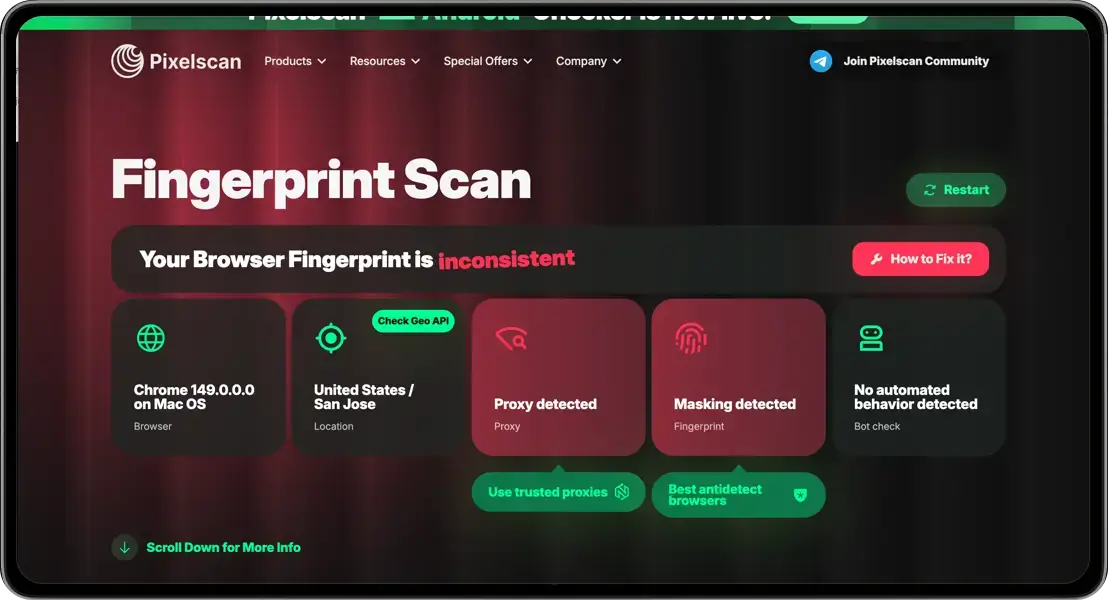
All tests have been verified through real-time detection services.Last tested: September 2026 (Chromium 150).
| Detection Service | Test Coverage | Key Checks | Test Result |
|---|---|---|---|
| BrowserScan | Browser Fingerprint | Canvas / WebGL / WebRTC / IP | 🟢 Passed · No anomalies |
| PixelScan | Fingerprint Check | Consistency / Proxy / Bot Detection | 🟢 Verified · Environment consistent |
| Iphey | IP & Device Trust | Cleanliness / Risk / Blacklist | 🟢 Trusted · No suspicious indicators |
| BrowserLeaks | Comprehensive Finger | Canvas / WebGL / IP / SSL | 🟢 Passed · Stable fingerprint |
| CreepJS | Advanced Fingerprint | Fingerprint / Headless / WebRTC | 🟢 Consistent · Environment stable |
| FingerprintJS | Open-source Fingerprint | Component Identification / Hash | 🔵 Generated · Visitor ID created |
| Fingerprint Playground | Bot Detection | Commercial Bot & Signal Check | 🔵 Evaluated · Signals analyzed |
| Am I Unique? | Browser Fingerprint | Fingerprint Uniqueness & Rarity | 🔵 Analyzed · Fingerprint captured |
| Cover Your Tracks (EFF) | Tracker & Fingerprint | Ad Blockers / Tracking Protection | 🔵 Tested · Protection evaluated |
| Sannysoft Bot Detector | Bot Detection | Selenium / WebDriver / Headless | 🟢 Passed · No automation detected |
| Incolumitas | Bot Detection | Behavioral Classification / TLS / TCP | 🔵 Analyzed · Detection profile generated |
| Rebrowser | Bot Detection | WebDriver / Runtime / Viewport | 🟢 Passed · No WebDriver leak |
| Device & Browser Info | Bot Detection | Playwright / Headless / Bot UA | 🟢 Human · No bot signals |
| DeviceInfo.me | Device Info | OS / Kernel / Hardware Fingerprint | 🔵 Detected · Desktop environment |
| Web Browser Tools | Canvas Fingerprint | Text API Rendering / Spoofing | 🟢 Stable · Fingerprint consistent |
| TraceScope | Kernel & Environment | UA / Client Hints / Environment Mod | 🟢 Verified · No modification detected |
| Whoer | Anonymity | IP / DNS / Proxy Status | 🟢 100% · No proxy detected |
| IPLeak | IP & DNS Leak | WebRTC Leak / DNS Servers | 🟢 Passed · No privacy leak |
| IPQualityScore | Fraud Scoring | Proxy/VPN Detection / Dashboard | 🔵 Scored · Risk assessment complete |
| Peet.ws TLS | Protocol Fingerprint | TLS / JA3 / JA4 Handshake | 🔵 Captured · TLS fingerprint generated |
| EthicalRed | Security Check | Browser Security & Privacy | 🔵 Evaluated · Security posture checked |
| Privacy Tests | Privacy Protection | State Isolation / Storage Partitioning | 🔵 Compared · Privacy behavior assessed |
| BrowserAudit | Security Standards | SOP / DOM Access Policy | 🟢 396 Passed · 34 Warnings |
| Privacy Test Lab | Privacy Score | WebRTC / Canvas / WebGL | 🟠 22/100 · Exposure detected |
| Privacy.net | Fingerprint Details | Canvas Hash / Overlap Probability | 🔵 Analyzed · Fingerprint identified |
| Webkay | Device Privacy | Geolocation API / Local Data | 🔵 Tested · Privacy surface evaluated |
| PrivacyCheck | Fingerprint Tracking | Academic Demo / Passive-Active Methods | 🔵 Tested · Risk surface evaluated |
| reCAPTCHA 3 Test | Bot Mitigation | Score / Behavioral Challenge | 🟢 Evaluated · Human interaction verified |
| Cloudflare Turnstile | Bot Mitigation | Challenge Integration / API Docs | 🔵 Verified · Challenge tested |
| BrowserScan TLS | Protocol Fingerprint | HTTP/2 Akamai / TLS Handshake | 🔵 Captured · JA3 / JA4 identified |
 Test results reflect the browser environment and configuration used during testing. Results may vary with browser version, profile settings, network conditions, and changes to third-party detection services.
Five common reasons teams reach for an antidetect browser and verify against public fingerprint tests.
Run multiple accounts across social, advertising, and marketplace platforms with isolated browser profiles for each account.
Crawl protected websites while reducing inconsistencies across browser fingerprints, headless signals, and TLS characteristics.
Keep trading accounts and exchange wallets isolated from unnecessary connections through cookies, fingerprints, and IP addresses.
Verify anti-fraud detection paths by testing controlled browser environments against public fingerprint and detection tools.
Manage client portfolios with isolated profiles for each brand, account, or project while keeping environments separated.

No. Just install ZLogin, create a profile with default settings, and attach a proxy. The fingerprint stays consistent out of the box — no extra configuration is required to pass the checkers listed above.

Experience the power of Zlogin and check your browser fingerprint securely.


